What is n8n? A beginner-friendly introduction, application scenarios, and learning path.


If you search online for "What is n8n," you will likely see an answer like this: an open-source workflow automation tool that can connect different applications. This sentence is not wrong, but it is as good as saying nothing—it does not tell you who this thing actually works for, or which part of your time it saves.
In plain terms: n8n is a tool that turns the repetitive things you do manually into a pipeline that can run by itself.
This is the first article in the whole course, and it has only one goal: before you start hands-on work, first make clear what it is, what it can do, and whether it is worth learning. After reading the whole article, you should be able to answer one question—which task on hand is suitable to hand over to it.
Who should read this, and what you need to prepare before reading
It is readable even with no automation experience at all. You do not need to know programming, do not need to buy a server, and do not even need to install software first. This article only covers concepts and judgment; the hands-on part is in the next article.
If you have already used Zapier or written scripts, you can focus on Sections 3 and 4, which explain their actual differences and can help you decide whether to switch.
First, look at what it looks like when it runs
No matter how many concepts are explained, it is better to take a look. The image below is the first practice workflow I made on a server: three blocks, run once from left to right, taking 233 毫秒.
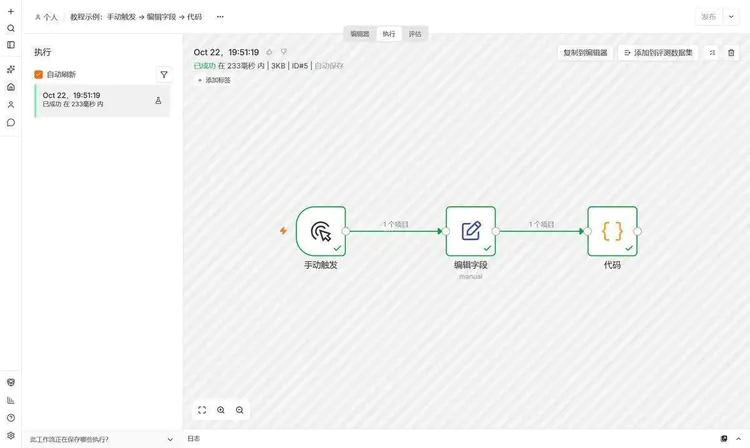
The three blocks in the image are calledNode. The one on the far left with the lightning icon is the starting point, called a trigger, meaning "where this thing starts"; the middle one is called Edit Fields, responsible for creating two fields; the far right is a Code node, running a short piece of JavaScript.
The arrows between the blocks are the direction of data flow. This entire line, from start to end, is calledWorkflow。
The job this pipeline does is very silly: it creates the two values "Fuzhou" and "27" and combines them into a sentence. But if you replace it with real business, it is handing the chain of actions "open a web page, copy data, paste it into a table, then send an email" to the machine. The structure is the same.
Three words are enough: Node, connection, workflow
- Node: A specific action. Sending an HTTP request, reading a row from a table, evaluating a condition, or running a piece of code are all a node. In the node list of my instance, you can browse nearly a thousand nodes, covering various common systems.
- Connection: Determines who comes first and who comes after. Data moves down along the line; it can branch and can merge.
- Workflow (Workflow): Nodes plus connections form the complete flow of a task. That is the actual “product” you build in n8n.
The real barrier is not these three terms, but one concept:How data is passed between nodes。
Data in n8n is always an “item array.” If the previous node queries 10 rows of data, passing to the next node gives 10 items, and the next node executes once for each of these 10 items, rather than processing only the first row. Once you understand this, you can troubleshoot most later “why is my output empty” issues yourself.
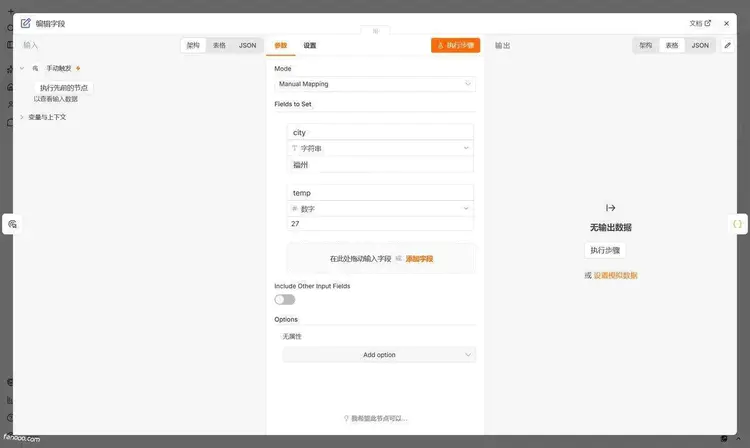
This panel was changed in n8n 2.x. Input on the left, parameters in the middle, output on the right—when debugging you don’t need to switch tabs back and forth, much handier than 1.x. Many Chinese tutorials online still show the 1.x interface, so following them will misalign with the current UI; this is one of the easiest places for beginners to get confused.
One more small detail: my instance is set to Simplified Chinese, but you’ll notice the parameter names are still in English—Mode, Fields to Set, Include Other Input Fields, and so on. n8n’s Chinese localization only covers the shell; node parameters are not translated. Don’t panic when you see English; just fill them in by matching the fields.
What problem does it actually solve?
Most repetitive work in the office is essentially the same thing:Move data from A to B, and change its shape along the way.
For example. A customer fills out a form on the website → you copy the information into a spreadsheet → send a message to sales → remind them to follow up three days later. Four steps, none hard, but doing them twenty times a day gets annoying, and something will definitely be missed.
That is exactly what n8n does: deliver data to where it should go on time, under conditions, and without errors, then conveniently notify the people who should know.
Keep this positioning in mind. It does not produce data, nor does it make judgments for you. Once you are clear on this, you won’t expect it to “analyze this month’s sales for me”—that kind of work is beyond it and requires a database and scripts.
How does it differ from Zapier, Make, and writing your own scripts?
| n8n | Zapier | Make | Writing your own scripts | |
|---|---|---|---|---|
| Deployment method | Cloud version or self-hosted | Cloud only | Cloud only | Your choice |
| Billing logic | Self-hosted is not billed per use | By task count | By operation count | Only servers are counted |
| Flexibility | High; code can be written | 中 | Relatively high | Highest |
| Learning curve | 中 | Easiest | Relatively steep | Depends on the person |
| Who is responsible for maintenance | Yourself | Platform | Platform | Self |
A few practical impressions. Zapier is the least effort—you can use it right after signing up. The trade-off is task-based billing: once volume picks up, the bill looks ugly, and when you hit slightly convoluted data processing you have to figure out workarounds. Make has stronger visualization, can draw real branches and loops, and is more moderately priced, but the interface has a higher learning cost.
n8n differs in two ways: it can be self-deployed, with data on your own machine; it does not charge by task count, so running it any number of times costs nothing extra—the only cost left is the server. The trade-off is also very real—upgrades, backups, and middle-of-the-night failures all have to be handled by you. This is not trivial; I will cover operations separately later.
As for writing Python scripts yourself: it is more flexible, but has no interface; changing a condition means changing code, and when something goes wrong there is no execution record to review. My division of labor is like this—write scripts for one-off data processing with convoluted logic; put things that need long-term scheduled runs, progress visible to people, and connections to several external systems into n8n.
A quick note on n8n's licensing. It is not a standard open-source license; it uses the fair-code Sustainable Use License. Personal use and internal company use are fine; but if you want to wrap n8n and sell it to customers, read the terms carefully first—don't assume.
What to hand over to it and what not to
What fits basically looks like this:
- Scheduled aggregation: every morning, pull information from several sources, deduplicate it, and generate a morning report
- Event triggers: when someone submits a form, sends an email, or an order status changes, automatically classify, store, and notify
- System sync: reconcile between spreadsheets, databases, and CRM, and list differences separately
- Content pipeline: crawl, clean, AI rewrite, human review, scheduled publish
- Monitoring and alerting: when a website goes down, an API errors, or data is abnormal, someone knows immediately
- AI-related work: connect large models into business processes for classification, extraction, and Q&A
What does not fit should also be made clear, so you don't take detours:
- Millisecond-level high-frequency real-time trading—it is not designed for this
- Complex calculations and algorithms—writing code directly is easier
- Processes that run only once a month and take ten minutes manually become harder to maintain as workflows
What is the relationship between n8n and AI?
n8n's popularity over the past two years is largely due to AI. It has built-in nodes for connecting large models, and a whole set of nodes for building Agents: give the model tools and memory, and let it decide which to call first.
But you need to get the balance right. Workflows are deterministic: if the condition is met, go left; if not, go right; run it 100 times and the result is the same. Models are not like this: with the same prompt, it may classify correctly today and incorrectly tomorrow.
My principle is: give deterministic tasks to nodes, give ambiguous tasks to models, and always keep manual review for steps involving money and commitments. This principle will run through all subsequent AI-related articles.
How much does it cost
There are two paths, with completely different cost structures.
Using the official cloud version: pay monthly, skip installation and maintenance, and take the official website as the authority for pricing (it will be adjusted; I won't hard-code numbers). Self-hosting: the software itself costs nothing; the cost is one server; a 2-core 4G machine is more than enough for daily tasks, and a machine costing a few hundred RMB a year is sufficient. What is really expensive is time—installation, configuration, upgrades, and troubleshooting all have to be done by yourself.
Cloud or self-hosted: how to decide
There is actually only one criterion:Whether this batch of data can leave your machine.
For data such as customer lists, orders, and medical records, self-hosting is recommended. If you only connect to public information and set up an RSS alert, the cloud is more worry-free. Self-hosting also has two pitfalls specific to the domestic environment: a server may not be able to access overseas APIs, requiring separate network handling; conversely, the cloud version also cannot enter your company's intranet systems. This point is much more important than price—don't wait until you're done to discover that you can't get the data.
What basics are needed to learn it
If you can copy and paste and understand tables, you can start; the first stage requires no coding at all.
But as you move into the middle stages, you'll hit two walls: one is JSON—what the data looks like and how to extract one layer from it; the other is HTTP—what requests, responses, and status codes mean respectively. You don't need to master these two, but you can't bypass them. Later, when working with AI and Agent, you'll be required to understand errors and judge for yourself whether it's a data problem or a configuration problem.
From zero to usable: what route to take
I split the whole process into 8 stages; each stage has a clear deliverable, written inLearning Roadmapthat page. Here I'll give only three reminders about sequence:
- First get n8n installed reliably, then build workflows. If the data volume is not configured properly, deleting the container wipes all workflows; I've seen this more than once.
- First get one small workflow you have on hand working end to end, then learn new nodes. If you only read documentation without producing anything, you'll forget it all within a week.
- Don't rush to add AI. If data flow and error handling aren't understood, connecting a model will only make problems harder to troubleshoot.
The four areas where beginners are most likely to go astray
Chasing new nodes.There are nearly a thousand nodes in the node library; anything you don't use is noise. The truly high-frequency ones are just about twenty: Trigger, HTTP, Edit Fields, IF, Switch, Merge, Loop, Code.
Only running the happy path.APIs time out, get rate-limited, and return 500. People who get burned the first time they go to production basically trip up here.
Not checking execution records.When an error occurs, first check the first node that turned red in the execution records; it's much faster than asking people in a group chat.
Treating n8n as a low-code platform.It can write code, but its strength is orchestration, not computation. Leave heavy work to scripts or databases.
Security reminder
Self-hosted n8n is equivalent to putting the keys to a set of your systems on this machine. Three things must be done: bind a domain and enable HTTPS, and don't leave port 5678 exposed directly on the public internet; grant only the permissions actually needed to the API Key used by n8n; when backing up, don't omit n8n's encryption key—if the key is lost, the credentials in the database cannot be decrypted, and the data alone cannot restore them.
Summary
n8n is a tool for turning repetitive operations into pipelines. Its value isn't in the number of nodes, but in that after you write down "how this should be done", it does it every day without forgetting or missing anything.
The learning order comes down to three phrases: make the installation solid, get one running, then expand outward.
The next post covers exactly how to install it:How to install n8n: a complete beginner tutorial for local deployment and first runAfter installing, come back and run the three-node workflow above once more; it will be much smoother.
References
Last updated: October 22, 2026, using n8n 2.43.7. If your version is newer than this, the interface may have moved again.