How to choose among n8n, Zapier, and Make: run the numbers on price, flexibility, and maintenance cost.


Ask ten people about choosing among the three, and nine will answer "it depends on your needs"—which is no answer. This article doesn't beat around the bush: it lays out the costs of the same task across the three, factors in the time spent on it, and finally says how I would choose.
The conclusion comes first. If it runs a dozen-odd times a day, has no more than five steps, and doesn't touch the company intranet, Zapier or Make is easier—you don't even need to touch a server. If it runs hundreds of times a day, needs to read an intranet database, and requires code in the workflow, self-hosted n8n can save an order of magnitude in cost—the price is that the machine is yours to manage, and if it goes down at midnight, no one will take over for you.
This conclusion is too coarse to use directly because it lacks one number: how many times you actually run per month. Until that number is calculated, every comparison is someone else's scenario.
Who it's for
People choosing one of the three, or people who have already hit a wall with Zapier's free plan and want to see exactly where the cost comes from. If you have an idle VPS and are willing to log in and type commands, the cost calculations in section four will hit harder. If you have never touched automation, first readWhat Is n8nthen come back; this article assumes you know what "workflow" and "node" mean.
- The three do not use the same pricing unit
- How much the same workflow costs on each of the three
- Beyond money, where the differences in flexibility lie
- Part of the self-hosting bill is not money
- The licensing line is something anyone doing delivery must check first
- Four cases where I do not recommend choosing n8n
- The cost of switching tools
- One-week trial run: how to determine whether it runs successfully
- Pitfalls you will hit
- Three extra security matters that self-hosting adds
The three do not use the same pricing unit
This is the foundation of the whole article, and also the easiest place to misread. The "usage" you see on the three official websites is not the same thing at all.
Zapier counts by task.Each successfully completed action counts as 1 task; some apps or actions count as 2. Triggers do not count—an event coming in costs nothing, and only a completed action costs money. Its polling for "whether there is new data" also does not count, and coming back empty-handed certainly does not count. The built-in tools—Filter, Formatter, Path, Delay, Looping, Sub-Zap, plus Tables and Forms—do not consume tasks.
Make counts by credit.It has already changed the billing unit from operations to credits, and the announcement states an effective date of August 27. Most modules count as 1 per execution, and those going through AI Provider may count as more. The difference here is that trigger modules also count. Reading one record from an app costs 1 credit at that step. Router and error handling modules (Rollback, Break, Resume, Commit, Ignore) do not count.
n8n counts by execution.Running a workflow from start to finish counts as 1 execution; whether there are 3 nodes or 30 nodes in between, it is still 1. The number of data items does not multiply it either—processing 5 or 200 items in one execution is still 1. Moreover, only production executions count toward the quota: if you click the "Execute" button in the editor to test, even a hundred runs do not count.
| Zapier | Make | n8n | |
|---|---|---|---|
| Unit | task | credit | execution |
| How many are counted for one workflow run? | By action count: 6 steps count as 5 (trigger not counted). | By module count: 6 modules count as 6. | 1 |
| Data grows from 1 item to 200 items. | Grows accordingly; 20x is 20x. | Grows accordingly. | Does not grow. |
| Manually click test. | Counts if a Zap is on and runs. | Counts if a scenario runs. | Not counted. |
The last row is the difference I value most; it determines whether this system can scale. Assume: one workflow processes 200 orders, with 5 actions in between. On Zapier, one run counts as 1,000 tasks; running once a day is 30,000 tasks. On n8n, one run is still 1 execution; 30 runs a day is 30 executions. That is a 1,000x difference, not a difference in percentage.
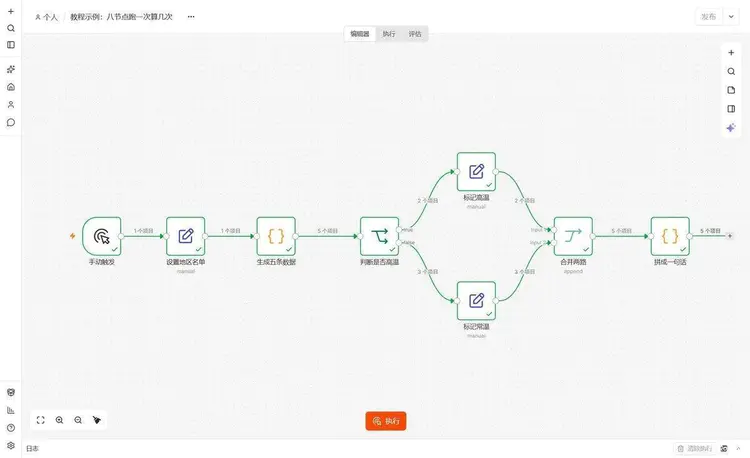
On my instance, I ran an eight-node workflow; a Code node in the middle split one item into 5 items, went through branches, then merged. The "number of items" shown under each node is the amount of data that flowed through in that run:
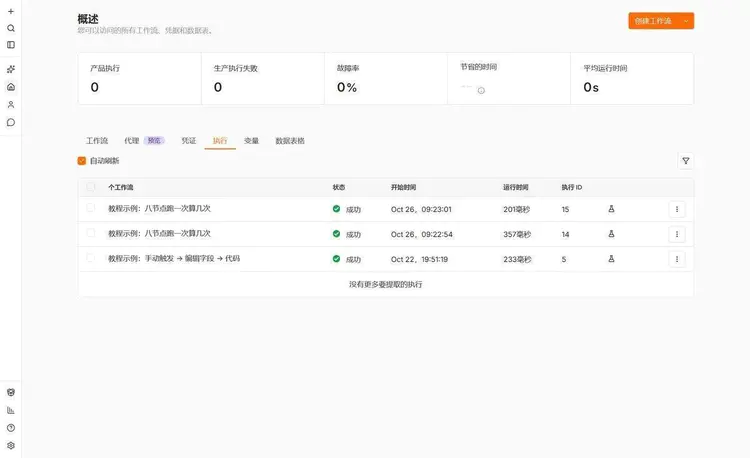
The execution records look like this; one row is one complete run, and the "Run time" on the right is the total duration of the entire workflow:
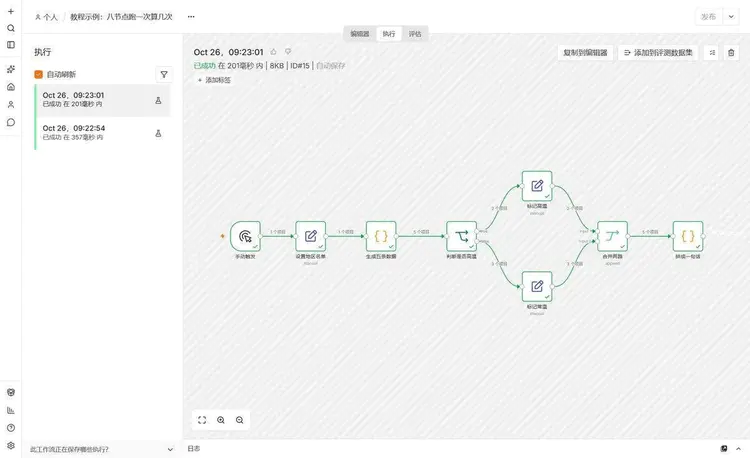
Click into it to see the details of this execution:
Same workflow, how much each of the three costs
Calculate with three real-shaped scenarios. All numbers are taken from publicly listed tiers on official websites; prices were checked on October 26, 2026, and may have been adjusted by the time you look.
Scenario 1: runs once per hour, 6 steps
Monitor an API, 24 times per day, 720 times per month. This is the most common job.
| Usage | Which tier it falls into | |
|---|---|---|
| Zapier | 5 × 720 = 3,600 tasks | Free plan has 100, 36 times short, must pay |
| Make | 6 × 720 = 4,320 credits | Core with 10,000 credits tier, annual billing equivalent to $9/month |
| n8n cloud | 720 executions | Starter €20/month, quota 2,500 |
| n8n self-hosted | 720 executions | 0, only server cost |
The result in this row is a bit counterintuitive:cloud n8n is more than twice as expensive as Make. Starter annual billing is €20, Make Core annual billing equivalent is $9. Many people assume “open source is definitely the cheapest,” forgetting that open source saves on license fees; cloud hosting still charges per run.
The Zapier column I can’t give an exact amount for, because its Professional plan lets you adjust the task tier; $19.99 is the starting price of the lowest tier, and 3,600 tasks require going higher. What is certain is that it is the most expensive of the three—expensive because of per-action billing; the longer your workflow, the more you lose.
Scenario 2: runs every 5 minutes, 6 steps
8,640 times per month. At this frequency, the gap starts to widen.
| Usage | Which tier it lands in | |
|---|---|---|
| Zapier | 43,200 tasks | Already quite high up |
| Make | 51,840 credits | Already past the 10,000 tier; you have to drag the slider up to see the price |
| n8n Cloud | 8,640 executions | Pro €50/month, quota 10,000 |
| n8n self-hosted | 8,640 executions | 0 |
Here n8n Cloud starts to pull ahead. The self-hosted gap is even less worth calculating: with over 8,000 runs a month, even the electricity bill is cheaper than the subscription.
Scenario 3: 10 times a day, 3 steps
300 times a month, two actions in total
Zapier counts 600 tasks, 6 times over the free line. Make counts 900 credits against 1,000 in the free tier—just barely under: no headroom at all; three more days of runs and you have to pay.This is the boundary of Make's free tier: not “enough,” but “just exactly used up.”
My own judgment: at the level of a dozen-plus times a day, using Make's free tier to last three to five months is no problem, but don't use it for critical work, because once you exceed the limit, the scenario stops outright and won't wait for you to renew.
Beyond money, where does the freedom differ?
| Zapier | Make | n8n | |
|---|---|---|---|
| Connectable apps | 9,000+ | 3,500+ | Official nodes + community nodes; with self-hosting, you can also write your own |
| Write code | Has code steps, priced per task; the longer it runs, the more it occupies | Has a Tools module | Code node, JS or Python, no extra charge |
| Connect to intranet systems | No | No | Yes, it runs in your own network |
| Where is data stored | Their server | Their server | Your own database |
| Version control | Paid tiers have Zap version control | — | Business tier and above can connect to Git; in the Community Edition, you export JSON archives yourself |
The first two rows determine your ceiling, the last two rows determine your compliance costs. If you need to read the company intranet's ERP or a legacy database, the first two vendors are immediately out — not because it is difficult, but because it is physically unreachable: they run in someone else's data center. This is the easiest thing to be discovered halfway through a solution discussion, and all the diagrams drawn earlier are invalidated.
Another item not often written in comparison tables: single execution duration. n8n Cloud Starter can run at most 5 minutes per execution, and only Pro gives 40 minutes. If you need to process large files or wait for a slow API, it's easy to hit 5 minutes. Self-hosting has no such limit, but the machine is your own; if memory is exhausted, it will still crash.
On the self-hosting bill, part of it is not money
This is the part I most want to say in this article, because all comparison articles on "n8n is free" miss it.
What self-hosting saves is the subscription fee; in exchange, it brings these things, all of which someone has to do:
- A machine and a domain nameAnd a certificate. Let's Encrypt renews automatically, but renewal failures are silent; by the time you notice, the certificate has already been expired for three days.
- UpgradesAfter 2.x, versions iterate very quickly; my machine is now on 2.43.7. Before each upgrade, back up the database and encryption key; after upgrading, spot-check whether one workflow can run. It takes about twenty-something minutes each time.
- BackupsThree things: database, encryption key, workflow export. Without the encryption key, all credentials in the restored instance cannot be decrypted, and you have to refill them one by one. Backing up only the database without the key is the most common failure mode.
- Failure alertsn8n won't notify you unless you configure it yourself. A scheduled task can fail silently for two weeks, and you won't know until someone asks, "Why is there no data in this month's table?"
- Troubleshooting when things go wrongContainer won't start, port is occupied, memory blows up—there is no customer support to call for these.
The time cost is roughly this: initial install plus HTTPS setup, one hour; time spent on it each month afterward, one to two hours; a real failure, one to three hours.
So when you calculate cost, your hourly rate has to be in the denominator. If you can't spare even half an hour a week, don't choose self-hosting—this has nothing to do with saving money; this work requires people. Paying for Zapier is essentially buying "someone will take care of it when something goes wrong."
My usage page looks like this and is worth a look:
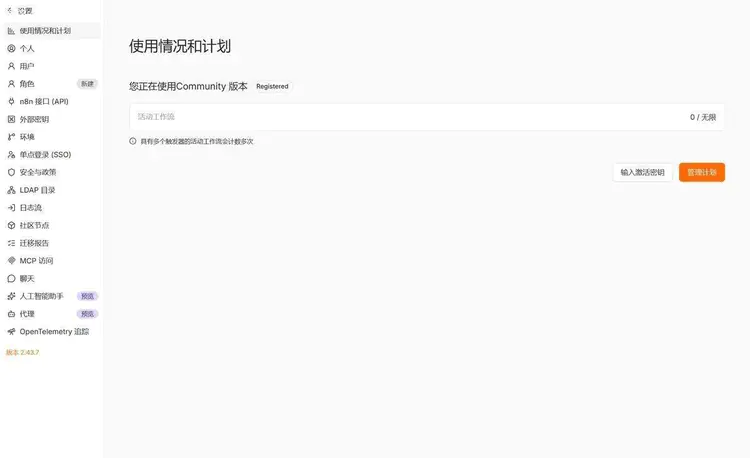
The small print on the second line of the page says "Workflows with multiple triggers are counted multiple times." That means if you attach two triggers to one workflow, it counts as two. The self-hosted version says "unlimited" here, so it doesn't affect me, but if you bought a cloud license, this one will bite.
On the licensing front, people doing delivery must read this first
n8n is not under an open source license; it uses its own Sustainable Use License under the fair-code label. The terms allow more than you might imagine: internal business use, modifying code, making derivatives, building workflows for clients, and doing n8n-related consulting and operations are all fine. Only two things are not allowed: rebrand n8n and sell it as a product to clients; set up your own instance and charge others for access. These two require a separate commercial agreement.
People doing agency operations are most likely to be vague here. Compared with the previous license (Apache 2.0 plus Commons Clause), the focus of this change is removing the "no consulting fees" clause—now you can charge for building workflows for clients and for consulting and operations without any additional agreement. As long as what you sell is your own expertise, not a rebranded n8n shell, there is no problem.
You need to weigh the in-between model yourself: customer data runs on the n8n you deploy, and you charge a monthly service fee. This is more like "hosting" than "consulting." If you really want to turn it into a business, send an email to license@n8n.io; it is much cheaper than fixing it afterward.
By comparison: Zapier and Make are pure SaaS; you pay for the service and don't have this concern, but you also can't move things out.
Four cases where I don't recommend choosing n8n
No one on the team touches the command line.It's not that they can't learn; it's that no one is willing to log in and check logs on the night something goes wrong. For this kind of team, paying for Zapier is worth the money.
Need vendor SLA and phone support.Self-hosting doesn't have it. The community forum is good, but it doesn't promise a two-hour response.
Only one or two simple automations.Setting up a server, configuring HTTPS, and setting up monitoring just to sync forms to a spreadsheet is not worth it. Use Make's free tier; 900 credits a month is enough.
Want to use it to sell a white-label product.As said in the licensing section, you need to sign an agreement first. Selling the open source version directly is a breach of contract, not a "gray area."
The cost of switching tools
There is no one-click migration among these three. Zap is a linear structure of “trigger + action”; scenario is a canvas with modules and routing; n8n’s workflow is an arbitrary directed graph. The data structures don’t match, the exported JSON can only serve as reference, and the logic has to be rebuilt.
My rule of thumb: for a flow of about ten steps, rebuilding it in another tool takes half a day to a day, including debugging and reconnecting credentials. If you’ve already accumulated thirty or forty, one switch is two or three weeks.
So when choosing, don’t just look at this month’s bill; look at roughly what volume you’ll have in three years. For low-frequency, stable workflows, choose the low-maintenance option; for high-frequency ones that will grow, move early to something you can manage yourself—don’t wait until you’ve accumulated a pile and then migrate.
One-week trial: what counts as working
Don’t decide based on official comparison tables; pick one real workflow and run it for a week. There’s only one requirement: this workflow must not be fatal if it fails once—don’t test with a payment-collection workflow.
- Write down how many times this workflow runs per day and how many steps are in the middle. These two numbers are all the input; all later calculations depend on them.
- Calculate the monthly total: runs × steps. Then multiply by the average number of data records processed per run; the two that bill by step need this number.
- Take this number to the pricing pages of the three official sites and match tiers—don’t match “plan names,” match quotas.
- Run it for a full seven days and record two things: how many times it failed, and how long it took you to fix it.
After the run, put these three numbers together, and the choice basically emerges on its own: usage determines cost, failure rate determines stability, and repair time determines whether you can tolerate it. The third is the easiest to ignore and the easiest to make people give up—people who move from Zapier to self-hosting often give the reason not as money, but as “when something goes wrong, I can’t see anything.”
If you’re trialing n8n, check these four signs to verify it’s working: under each node on the canvas there’s a green check and “N items”; a “Success” row appears in the execution list; clicking into it shows the input and output of each node; and the production execution count on the “Overview” page is still 0 (because manual executions don’t count as production executions). The last one most easily makes people think it didn’t work, but it’s actually normal.
Pitfalls you’ll hit
1. Comparing subscription prices directly without looking at billing units.For the same 6-step workflow, Zapier counts 5 tasks, Make counts 6 credits, and n8n counts 1 execution. They all look like single digits, but the meanings differ by a layer: the first two multiply by steps, the latter multiplies by runs.
2. Thinking Make still counts by operations.Its billing unit is already credit; the line in the official FAQ, “As of August 27, credits are the billing unit in Make,” refers to this change. The operations numbers in old tutorials don’t match the new bill—that’s why.
3. Thinking n8n being free means zero cost.The software costs nothing, the machine costs money, and your time costs even more. Two hours of maintenance a month, discounted at your hourly rate, may be much more expensive than Make’s $9.
4. Thinking empty requests don’t count.n8n’s docs state it clearly: a Webhook trigger counts as one execution every time it receives an incoming request, including when the body is empty {}. Using a webhook as a health check probe, hitting it every 10 seconds gives 260,000 execution records a month, all on the bill. Requests rejected before the workflow starts do not count.
5. Calculating polling billing in the wrong direction.A polling trigger counts as one execution only when it finds new data; coming back empty-handed doesn’t count—that’s in your favor. Conversely, this also means the count you see in the sandbox is lower than the bill; don’t use numbers from the test environment to estimate the production bill. Scheduled triggers are the opposite: every trigger counts, regardless of success or failure.
6. Forgetting that the trial period ends.Newly registered Zapier accounts automatically enter a 14-day Professional trial. Multi-step Zaps you build during the trial stop when it downgrades to the free plan—the free plan only supports two steps. Some people treat this as “Zapier suddenly broke.”
7. The encryption key is lost.n8n credentials are encrypted with a key, and the database stores ciphertext. When switching machines, reinstalling, or migrating, if the key isn't carried over, all credentials cannot be decrypted, nodes report invalid credentials one by one, while the password you entered is clearly correct. This key is in the data directory; don't miss it when backing up.
8. Long-running tasks hit the execution time limit.n8n Cloud Starter is limited to 5 minutes per run. Processing a table of several hundred MB or waiting for a slow API can easily exceed it; exceeding it is an execution failure, not a queued retry.
The three extra security matters of self-hosting
Choose SaaS, and the security boundary belongs to the other party; choose self-hosting, and the boundary is yours. Specifically three:
Exposure surface.n8n comes with username/password by default, but installing it on a public domain is like hanging this door outside the wall. At minimum do three things: enable HTTPS, replace weak passwords, and turn off self-registration. Scanners have ready-made dictionaries for n8n login pages; this is not fearmongering.
Don't put the key and backups in the same place.An encryption key leak equals all credentials leaking—inside there may be email passwords, database passwords, and payment API keys. Backup files contain encrypted credentials; keep the key file separate, and don't stuff it into the same cloud drive folder as the backups.
Data ownership must be thought through clearly.The benefit of self-hosting is that data doesn't leave your own database; the cost is that backups, deletion, and retention are all on you. With Zapier or Make, data passes through their servers; for fields involving customer phone numbers, ID cards, and similar, check their DPA and data retention terms before deciding. This item has nothing to do with price, but it is the least negotiable item among the three options.
Summary
The difference among the three is not “who has more features”; it is what unit they charge by. For those billed by action, the longer the workflow, the more expensive; for those billed by execution, nodes and item counts do not get magnified.
Low frequency, small volume, no internal network access: Zapier or Make free tier is enough; don't run a server just for “open source”. Once executions reach hundreds, you need to process batch data, or you need to read the internal network, n8n self-hosting makes economic sense—provided you're willing to spend one or two hours a month on it.
Cloud n8n is not a drop-in replacement for self-hosting. It is more expensive than Make, less hassle than self-hosting, sits in the middle, and suits people who “want the n8n model but don't want to manage a machine.”
Continuing below
After choosing the tool, the next real question is how to build the first workflow. Three nodes running from a blank canvas to producing results are written in“The First Workflow”. If you're not yet familiar with the interface, first open“n8n Interface Tour”. If reading in order, enter viaCourse Table of Contents; each article can be read independently.
References
- n8n Pricing: execution quotas, concurrency, and maximum duration per execution for each tier
- Understand executions: what counts as one execution and which trigger methods count toward the quota
- Community license: permitted and prohibited uses of the Sustainable Use License, including the definition of consulting services
- Zapier Pricing: task billing rules, the two-step limit on the free plan, and trial details
- Make Pricing: credit billing rules, pricing for each tier, and the free-tier quota
Last updated: October 26, 2026, using n8n 2.43.7.