How to troubleshoot n8n startup errors and port usage


When server-side n8n won't start, it's one of the easier failures to troubleshoot—it always leaves you a line of error. The trouble is that line often points in the wrong direction. To write this article, I started an http.server with python to occupy the port, and n8n still told me "Is another n8n already running?"
Below I classify startup failures into four categories by "which line the log stops at," each paired with a command you can type immediately. The original error text was all produced on my own 2.43.7, without changing a single character.
This is for self-hosters: globally installed via npm, run with Docker, or managed by systemd all count. Skip it if you use the cloud version—startup there isn't yours to worry about. There is only one prerequisite: you can log into the machine's shell, or you can view the container logs.
- Startup is a four-stage pipeline; which stage the log stops at determines what to check
- Port occupied: three commands, plus one misleading message
- Port not occupied but still won't start: wrong address, insufficient permissions
- ECONNREFUSED: who exactly is refusing you
- The "SQLite package has not been found installed" one
- Cannot write to the .n8n directory
- My actual troubleshooting order
- How to tell it has really started
- The "service refused connection" message in the UI
- Quick reference for six original error messages
- Three security reminders
Startup is a four-stage pipeline; which stage the log stops at determines what to check
First remember what a normal startup looks like; otherwise, when you see a partial log, you have no idea which part is missing. This is a complete startup on my machine, starting from an empty directory:
No encryption key found - Auto-generating and saving to: /data/n8n/.n8n/config
Initializing n8n process
n8n ready on 127.0.0.1, port 5678
Migrations in progress, please do NOT stop the process.
Starting migration InitialMigration1588102412422
Finished migration InitialMigration1588102412422
Editor is now accessible via:
The "No encryption key found" line only appears on first startup; after that, the key is already written into .n8n/config it, and is no longer printed. The key is paired with the database; if you change the key, all credentials stored in the database cannot be decrypted—that's another article. Here you only need to remember that it belongs to the first startup stage.
I split the whole process into four blocks; the error forms for failures in each block are completely different:
| Order | What it is doing | Typical errors when this stage fails |
|---|---|---|
| 1 | Read the configuration file, load or generate the encryption key | EACCES: permission denied, mkdir、Failed to load command "start" |
| 2 | Connect to the database, with 5 retries built in | Initial database connection attempt N failed: connect ECONNREFUSED、SQLite package has not been found installed |
| 3 | Start the HTTP listener | n8n's port 5678 is already in use、n8n webserver failed, exiting listen EADDRNOTAVAIL |
| 4 | Run the database migration and start the task runner | Migrations in progress After that, not another line Finished, and the process is gone |
There is a detail that is especially easy to misjudge:n8n ready on 127.0.0.1, port 5678 does not equal being usable. It appears Migrations in progress before, the port is already open, and the database is still upgrading. At this point, it is normal that refreshing the editor won't open it; wait until the migration finishes.
In the fourth paragraph there is also something only available in 2.x: the Code node does not run in the main process; n8n will start another n8n task-runner. You can see it by checking the parent-child relationship with ps.
# ps -o pid,ppid,etime,cmd -p 1053,7782
    PID    PPID   ELAPSED CMD
   1053       1  6-09:37:45 n8n start
   7782    1053  6-09:33:32 n8n task-runner
The main process is present, the runner is not; the main UI can open, but as soon as you execute a Code node, it errors. When you encounter this symptom, don't think about the code first; first ps check whether the runner is present.
Port in use: three commands, plus one misleading hint
First see what n8n itself says. When it hits a port conflict, it won't dump a stack trace; just one plain sentence, then the process exits with exit code 1:
n8n's port 5678 is already in use. Do you have another instance of n8n running already?This sentence draws 80% of the attention to “another n8n”. The reality is: whatever is occupying the port could be anything. I used python3 -m http.server 5693 to occupy 5693, then pointed n8n to 5693, and it still said this same sentence. Guessing is useless; check.
# ss -ltnp 'sport = :5678'
State  Recv-Q Send-Q Local Address:Port Peer Address:Port Process
LISTEN 0      511        127.0.0.1:5678      0.0.0.0:*    users:(("n8n start",pid=1053,fd=24))
ss It is built in on Debian, Ubuntu, and CentOS, has the cleanest output, and directly gives the pid. If you don't want to remember the filtering syntax,lsof that's also fine, but the process name will contain escapes:
# lsof -i :5678 -sTCP:LISTEN
COMMAND    PID USER   FD   TYPE DEVICE SIZE/OFF NODE NAME
n8nx20st 1053 root   24u  IPv4  33852      0t0  TCP localhost:5678 (LISTEN)
n8nx20st It's not garbled text,x20 it's a space; the real name is just n8n start. The first time you see it, you'll think it's some unfamiliar program; don't panic. If you only want the pid,fuser the easiest way:
# fuser -n tcp 5678
5678/tcp:             1053
Once you have the pid,ps -o pid,etime,cmd -p <pid> check how long it has been running. This step can distinguish two completely different situations.
One is that your own old process hasn't died.In systemd, you stop did it, or docker rm ..., and the process is still hanging in the background. If etime shows an n8n running for several hours, that is basically it. The clean approach is to first systemctl stop n8nthen use killdon't start by kill -9—if a migration is hard-killed halfway through, the database may get stuck in a half-upgraded state, and that can only be rescued by restoring a backup.
Another case is that another service has occupied your port.On a cloud host, it is very common for ports like 8080 and 3000 to be quietly occupied by a panel or some small Node service. At this point there are only two ways: make the other party give way, or change the port yourself.N8N_PORT=5679 Changing it takes a minute, but don't change only one place—the reverse proxy,WEBHOOK_URL、N8N_EDITOR_BASE_URL the hardcoded ports in them will be wrong as well; that is how webhook requests fail to arrive.
There is another case that looks like a port conflict but is actually a listen address issue. n8n's N8N_LISTEN_ADDRESS default value is ::, dual-stack, and will also cover IPv4. So if another process only occupies 127.0.0.1:5678, starting n8n with the default value still won't start. I tested it: python only bound to 127.0.0.1:5694, and n8n started on 5694 with the default address, but it still reported "port 5694 is already in use".
By the way,:: binding to all interfaces brings another problem: n8n is directly exposed on all network interfaces, including the public one. My machine does the opposite, listening only on localhost and leaving the outside to nginx.
Environment=N8N_HOST=127.0.0.1
Environment=N8N_LISTEN_ADDRESS=127.0.0.1
Environment=N8N_PORT=5678
Environment=N8N_PROTOCOL=http
Even if the port is not occupied, it still won't start: wrong address, insufficient permissions
The port is free, so why won't it start? Two causes are most common, and their error messages look nothing alike.
The first one: the listen address does not exist on the local machine. After changing data centers, rebuilding the instance, or a DHCP lease renewal changing the IP, that old IP in the configuration file is no longer recognized:
n8n webserver failed, exiting listen EADDRNOTAVAIL: address not available 10.9.9.9:5679This is what I got when I set N8N_LISTEN_ADDRESS to 10.9.9.9; that machine's network interface does not have this address. When you see EADDRNOTAVAIL don't check ports anymore; go ip addr check what IPs the local machine actually has, or simply write 127.0.0.1。
The second one: permissions. Ports below 1024 require root, or require CAP_NET_BIND_SERVICE this capability. This layer of error is thrown by Node, not wrapped by n8n, so it will carry a node:events stack trace:
node:events:505
    throw er; // Unhandled 'error' event
    ^
Error: listen EACCES: permission denied 0.0.0.0:80
    at Server.setupListenHandle [as _listen2] (node:net:2306:21)
I don't recommend running n8n on 80 just for convenience. A reverse proxy layer gives you too much: certificate renewal, gzip, rate limiting, IP allowlisting, all easier than n8n's own setup, and changing the configuration does not require restarting n8n. If you must use 80 directly, then grant permissions properly. My own machine runs as root for convenience; I don't recommend doing this on a shared machine—n8n stores credentials for all your third-party services, and once process privileges are expanded, what can be taken away expands with them.
ECONNREFUSED—who exactly is refusing you
This error is actually emitted by n8n in the second startup stage: it goes to connect to the database, no one answers on the other side's port, and the kernel directly returns an RST. n8n retries 5 times, with intervals of 1 second, 2 seconds, 4 seconds, 8 seconds, and 16 seconds, about 31 seconds in total, then gives up and exits.
Initial database connection attempt 1 failed: connect ECONNREFUSED 127.0.0.1:5433. Retrying in 1000ms
Initial database connection attempt 2 failed: connect ECONNREFUSED 127.0.0.1:5433. Retrying in 2000ms
Initial database connection attempt 3 failed: connect ECONNREFUSED 127.0.0.1:5433. Retrying in 4000ms
Initial database connection attempt 4 failed: connect ECONNREFUSED 127.0.0.1:5433. Retrying in 8000ms
Initial database connection attempt 5 failed: connect ECONNREFUSED 127.0.0.1:5433. Retrying in 16000ms
There was an error initializing DB
There was an error initializing DB
Error: There was an error initializing DB
    at Start.exitWithCrash (/usr/lib/node_modules/n8n/src/commands/base-command.ts:361:28)
The passage above is from my changing DB_TYPE it to postgresdb, with the port deliberately pointed to 5433 where no one is listening; this was produced and copied exactly as-is.There was an error initializing DB Running it twice in a row is also real; it is not me copy-pasting wrong. If you see duplicate lines, you don't need to doubt yourself.
Understand retries correctly: it is a retry of "connecting to the database at startup", not "waiting forever". When you see attempt 1, don't rush to restart; wait 31 seconds; if you see all 5 attempts fail, then it is truly unreachable, and restarting a hundred times is the same.
The port in the address is the only useful clue.DB_POSTGRESDB_PORT Default is 5432; reporting 5433 means you configured it yourself, most likely copied a config and forgot to change it; reporting 127.0.0.1:5432 But you clearly installed the database on another machine, which means the environment variable did not take effect—in systemd Environment= one line written wrong, in Docker -e one missing, either will cause this.
The most troublesome case is in a container. n8n runs in a container, and the config says DB_POSTGRESDB_HOST=127.0.0.1, this 127.0.0.1 is the container's own loopback, not the host. The database runs on the host; from the container it cannot connect no matter what, and the error is still ECONNREFUSED, looking exactly the same as "database not started". Either put the database into compose too and use the service name as host; or make the container recognize the host address.
Verify connectivity outside first; it is much faster than guessing in the n8n logs:
# nc -vz 127.0.0.1 5678
Connection to 127.0.0.1 5678 port [tcp/*] succeeded!
# nc -vz 127.0.0.1 5433
nc: connect to 127.0.0.1 port 5433 (tcp) failed: Connection refused
If nc connects but n8n still cannot connect, the problem is in credentials and database name; look further down at postgres's own logs, don't circle around on the n8n side.
The "SQLite package has not been found installed" one
This is the most easily misread error in the second startup stage; I have hit it myself. It appears in the default SQLite scenario—that is, when most people install n8n for the first time. The log looks like this:
Initial database connection attempt 1 failed: SQLite package has not been found installed. Try to install it: npm install sqlite3 --save. Retrying in 1000ms
Initial database connection attempt 2 failed: SQLite package has not been found installed. ...
...
Error: There was an error initializing DB
DriverPackageNotInstalledError: SQLite package has not been found installed. Try to install it: npm install sqlite3 --save.
    at SqliteLibrary.loadLibrary (/usr/lib/node_modules/n8n/node_modules/@n8n/typeorm/dist/driver/sqlite-pooled/SqliteLibrary.js:30:19)
People are easily led away by the stack trace at the end and think "failed to initialize DB" means the database is broken. The first line actually makes it clear:sqlite3 This native module is not there. When npm installs n8n, it compiles a native module along the way; an incomplete compilation environment, having upgraded the Node major version, or having added during package installation --ignore-scripts, will all cause this part to be missing. This log was sandwiched between two successful startup records on my machine; I didn't note down which step fixed it at the time, I only know it has nothing to do with the database itself.
There are three ways to fix it, ordered from lowest to highest cost: set up the compilation environment (python3、make、g++) then reinstall n8n; or enable N8N_REINSTALL_MISSING_PACKAGES=true, let it install the missing packages by itself at startup; writing it into Dockerfile or systemd both work; if you can't be bothered, switch to the Docker image, where these native modules are precompiled. The sentence in the error npm install sqlite3 --save is meant for the scenario of "installing n8n as a local dependency"; copying it verbatim for a global installation may not take effect.
Also note the version requirements: n8n requires Node 20.19 to 24.x; Node outside this range will have various strange native module problems. Mine is 24.21.0.
Cannot write into the .n8n directory
The first section fails to start, and the error includes EACCES 和 mkdir, which indicates it cannot even create its own data directory..n8n The directory stores database files, encryption keys, and configuration; if the directory is not writable, it simply cannot start at all:
No encryption key found - Auto-generating and saving to: /root/n8n_noperm/.n8n/config
Error: Failed to load command "start"
Error: EACCES: permission denied, mkdir '/root/n8n_noperm/.n8n'
    at mkdirSync (node:fs:1410:26)
    at InstanceSettings.loadOrCreate (/usr/lib/node_modules/n8n/node_modules/n8n-core/src/instance-settings/instance-settings.ts:353:12)
There is a gotcha in this section:It first prints “No key, generating and saving to a path”, and only then fails. Looking only at the previous line, you’d think everything is fine, but not a single character was actually written. There is only one criterion—whether there is Editor is now accessible via, and if not, it did not start.
This section was produced by running it as the nobody user, with the target directory at /root the following, and no one can write to it. In real operations, Docker is more common: n8n in the container runs as the node user with uid 1000, and on the host, if the directory you mkdir end up with is root 700, mounting it in gives this error. The fix is to correct the owner of the host directory, not to grant full permissions:
chown -R 1000:1000 /srv/n8n-datachmod 777 Even if it can make it start, I don’t recommend it. That directory contains encryption key files; if any user on the same machine can read them, it is equivalent to hanging the keys to all third-party credentials in the database on the door handle.
My actual troubleshooting order
When there is a problem, don’t start reading from the first line of the logs; follow this order, and you can locate the section in five minutes:
- Check the service status.
systemctl status n8nOrdocker ps -a. The key is not whether it is active or failed, but theRestartcount andRestarting (1) 3 seconds agothis kind of loop. A loop means it is repeatedly starting and repeatedly dying; go check the logs, and don’t mess with systemd. - Find the logs.First try
journalctl -u n8n -n 50. On my machine, it returns-- No entries --, because the unit redirects output to a file:StandardOutput=append:/data/logs/n8n.out.log. In this case, directlytail -100 /data/logs/n8n.out.log. Docker is justdocker logs --tail 100 n8n。 - Count how many times it has restarted.
grep -c 'n8n ready on' /data/logs/n8n.out.log, mine is 30. The log is append-only, so all history is there; if the same error appears repeatedly, it is a restart loop. - Check the port.
ss -ltnp 'sport = :5678', match it against the above. - Verify health.
curl -s http://127.0.0.1:5678/healthzIf the process is alive, it will respond{"status":"ok"}, this does not check the database.
The one from step 2 journalctl returns empty, which easily makes people think the service did not write any logs at all. The service is clearly managed by systemd, but the logs are in files. So first systemctl cat n8n check whether there is redirection; it is faster than blindly digging through logs.
There are two more steps on the Docker side:docker ps -a the STATUS column will say Restarting (1) 3 seconds ago, and if the number in parentheses keeps increasing, it is a restart loop; if the port does not match, first check docker port n8n, it will list the host port and container port. Mine is installed via npm; I have not personally reproduced the exact error text in the container, so these points are written based on common Docker behavior.
How to tell it is really up
A listening port does not mean it can do work. n8n has two ready-made check endpoints, and the difference is very practical:
# curl -s -o /dev/null -w '%{http_code}n' http://127.0.0.1:5678/healthz
200
# curl -s http://127.0.0.1:5678/healthz
{"status":"ok"}
# curl -s -o /dev/null -w '%{http_code}n' http://127.0.0.1:5678/healthz/readiness
200
/healthz A 200 only means the process can respond; it does not check the database./healthz/readiness is the one that means “the database is connected and migrations have finished.” In the tens of seconds after a restart, the former may already be 200 while the latter has not caught up yet; that means migrations are still running. When writing monitoring scripts, use readiness, not healthz—only the former reflects “whether this machine can receive traffic.”
After both are 200, run through a real workload:
- Open the editor; you can log in and see the workflow list, not a blank screen spinning.
- Run any workflow with a Code node; it succeeds. This step verifies the task runner, which was mentioned earlier as often being ignored.
- Publish the workflow and let it really run once; in the execution records you can see this production execution with a successful status.
Do not skip the third item. In some deployments the editor is completely normal but does not execute when the time comes; the cause is that the worker in queue mode is not connected, and this kind of problem is only exposed by actually running it once.
The “service refused connection” message in the UI
When startup fails, you cannot get into the UI at all, so this section is about another case—n8n is up, but what the workflow connects to is not up. The troubleshooting directions for these two failures are completely opposite; do not mix them up.
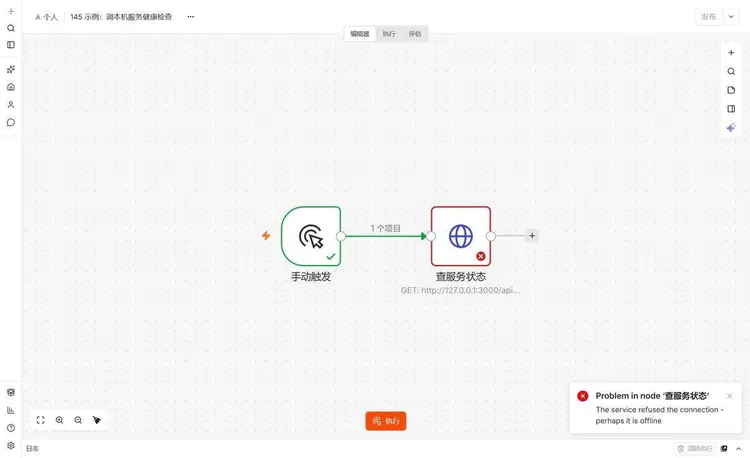
After one failed run, the node on the canvas is red, and a pop-up appears in the lower right corner Problem in node '查服务状态', with a line of small text below The service refused the connection - perhaps it is offline. This sentence is plain language translated by n8n; it mentions neither the port nor the protocol.
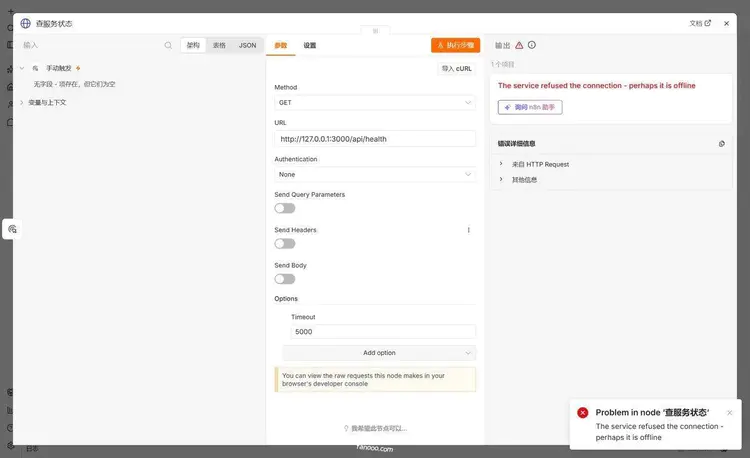
Double-click the node, scroll down in the output panel on the right, and there is a collapsed "Error Details"; only after expanding it can you see the raw information.
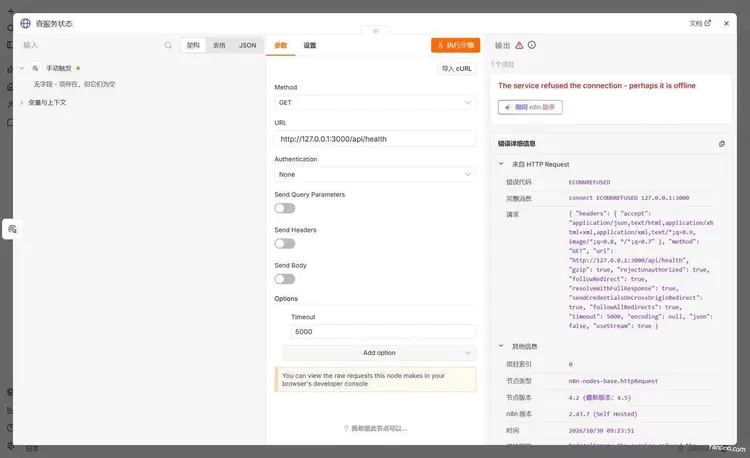
The "Error Code" line is ECONNREFUSED, and the "Full Message" is connect ECONNREFUSED 127.0.0.1:3000. At this point it matches the error from startup: the same error code, only this time it occurs in the node. Take this port to nc -vz, and you immediately know whether it is reachable.
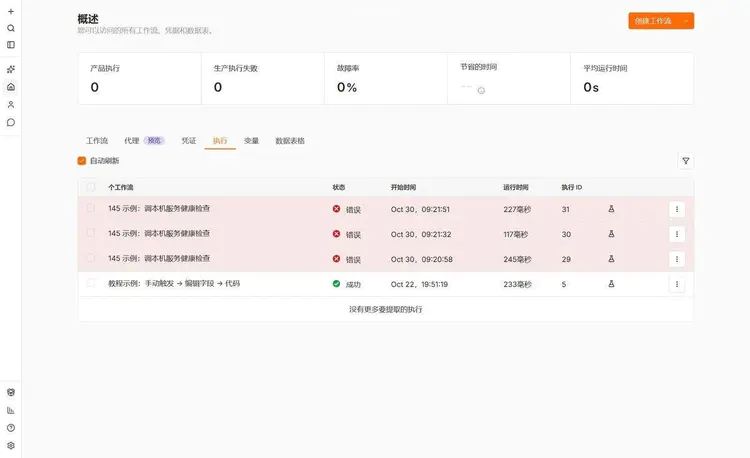
There is another free criterion in the execution record: runtime. My three runs were 227, 117, and 245 毫秒 respectively. It is only this fast when TCP did not even complete the handshake; if the other side connected but returned 500, or if it timed out, the duration would range from several hundred 毫秒 to several 秒, or even hit the timeout you set. For errors within two hundred 毫秒, think directly in terms of "port/address/service not started"; thinking in terms of "the interface returned incorrect content" is a waste of time.
Quick reference for six original error messages
| Original error text | Where it gets stuck | Resolution direction |
|---|---|---|
n8n's port 5678 is already in use... |
Third segment, port | ss -ltnp 'sport = :5678' Find the pid, stop the old one or change the port |
n8n webserver failed, exiting listen EADDRNOTAVAIL |
Third segment, address | The IP in the configuration is not present on the local machine,ip addr Verify |
Error: listen EACCES: permission denied 0.0.0.0:80 |
Third segment, permissions | Ports below 1024 require privileges; change the port or add capabilities |
Initial database connection attempt N failed: connect ECONNREFUSED |
Second segment, database | Wait for the full 5 retries, then nc -vz host port |
DriverPackageNotInstalledError: SQLite package has not been found installed |
Second paragraph: dependencies | 补 sqlite3, or reinstall n8n |
EACCES: permission denied, mkdir '/.../.n8n' |
First paragraph: directory | The data directory owner is incorrect; change the owner, don't use 777 |
Three security reminders
If the listening settings were temporarily loosened during troubleshooting, remember to change them back.To take a quick look from outside to see whether it has started, set N8N_LISTEN_ADDRESS to 0.0.0.0 or add a -p 5678:5678, then forget it after looking. The n8n editor on the public internet is just a login box; a scanning script can try thousands of times a day. This machine listens only on 127.0.0.1, and public access goes through nginx 443; this is the normal state, don't change it to a temporary state for troubleshooting and leave it there.
Scan the logs before posting them.The startup log contains the full webhook URL, and the webhook path itself is a credential; with the path, someone can inject data into your workflow; the stack trace contains the installation path, internal network address, and database hostname. Before posting to a group or asking for help on a forum, replace these, and post only after replacing them.
Don't write the database password on the command line.docker run -e DB_POSTGRESDB_PASSWORD=xxx It will remain in shell history and will also appear in docker inspect the output, and anyone on the same machine who can execute Docker commands can see it. Use --env-file, or systemd's EnvironmentFile=, with file permissions 600. The unit posted earlier is written this way; the password is in /etc/n8n/instance-ai.env there, not in the unit.
Summary
Startup failures look varied, but there are actually only four parts: keys, database, listening, and migration. The line where the log stops determines which command you should run; guessing is useless—that line "Is there already another n8n running?" is specifically misleading.
Three commands are enough:ss -ltnp 'sport = :端口' find the occupant,nc -vz host 端口 verify connectivity,curl /healthz/readiness verify readiness. The rest is checking the table in this article against the original error text.
A final piece of experience:n8n ready on 和 Editor is now accessible via The part in between is the easiest to assume is already done. Restarting before the migration has finished running, or simply cutting the power, is the costliest “minor operation” I have seen.
Continue below
The previous post is“The First Workflow: Manual Trigger → Edit Fields → Code”.To build a workflow from scratch, see that post. If you haven't installed it yet, see“How to Install n8n”.If you're unfamiliar with the interface, check“Interface Tour”.I've collected scattered troubleshooting records on theTroubleshootingpage; the table of contents for the whole course is athere。
References
- Monitor n8n:
/healthzOnly checks process liveness,/healthz/readinessrequires the database to be connected and migrations to be completed - Deployment environment variables:
N8N_PORTdefault 5678,N8N_LISTEN_ADDRESSdefault::、N8N_USER_FOLDERpurpose - Database environment variables:
DB_TYPEdefault sqlite,DB_POSTGRESDB_PORTdefault 5432, as well as automatic recovery parameters for disconnections during runtime - Logs environment variables:
N8N_LOG_OUTPUTDefault console; when configured as file, logs are written to<n8n 目录>/logs/n8n.log - Use the command line:
n8n start、n8n export:workflowMost of these server-side commands do not require n8n to be running - Install with Docker: port mapping of the official run command and
/home/node/.n8n卷 - Install with npm: Node version range 20.19 to 24.x
- Node.js errors:
EADDRINUSE、ECONNREFUSED、EACCES、EADDRNOTAVAILTheir respective definitions
Last updated: October 30, 2026, using n8n 2.43.7.