Workflow, Node, Connection, Execution: four words that explain the world of n8n clearly.


On the canvas are five boxes and four lines. Export this thing as JSON, and only two keys remain:nodes 和 connectionsExecution records are in another place, lined up one by one, each with a number.
The three places are talking about the same thing, using four words: workflow, node, connection, execution. Once these four words are clear, reading any node tutorial later will be easier; if not, you'll keep bouncing between "I clearly clicked execute" and "why didn't it run".
You don't need to know how to write code. An installed n8n that can open and has run a workflow once is enough (if not installed, seethis post, if you're not yet familiar with the interface, first checkInterface tour). Mine is 2.43.7; your minor version may differ, so button positions may vary slightly.
- Four words, four things
- Workflow: a container, plus two states
- Node: the name is the primary key
- Connection: a two-level array; the first level is the output index
- Execution: one run, with a snapshot
- Put it together: the sequence for one troubleshooting pass
- How to know you really understand it
- Five errors you'll really run into
- Risks of export, sharing, and leaving traces
Four words, four things
First put up a comparison table; the next few sections will break it down.
| 词 | What it is | Where it is stored | Quantity relationship |
|---|---|---|---|
| Workflow | A set of nodes connected to do one thing | The workflow table in the database, one JSON | 1 workflow has N nodes. |
| Node. | One execution unit that does one step of work. | Of the workflow JSON. nodes in the array. |
1 node belongs to 1 workflow. |
| Connection. | Connect the output of the previous node to the input of the next. | Of the same JSON. connections in the object. |
1 workflow has N lines. |
| Execution. | This workflow was run once. | Execution table, independent of the workflow. | 1 workflow has N executions. |
The most confusing is the last line. A workflow is the blueprint; an execution is the construction. Change the blueprint ten times, and the previous construction will not change with it.
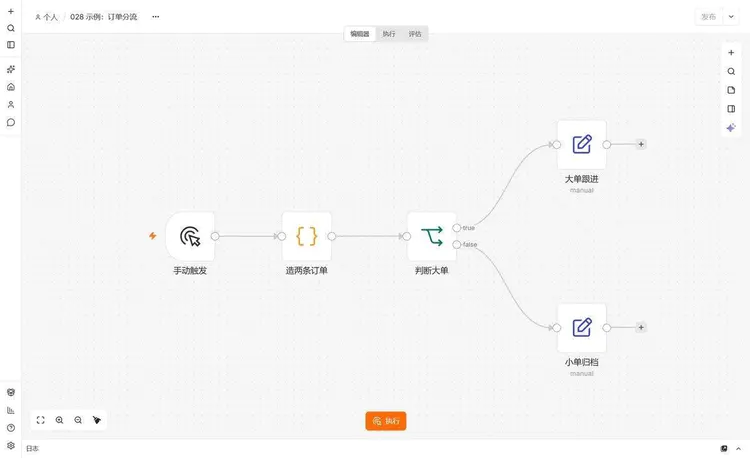
Workflow: a container plus two states.
The official definition is short: a set of connected nodes that automatically complete something; when a trigger fires, you click manually, or another workflow calls it, it starts running, executes node by node, and can branch, merge, and loop.
There is nothing to nitpick in the definition. What really needs attention is the state added after 2.x:Draft and published are two different things.。
When you change things on the canvas, n8n saves automatically, persisting to the database within one to five seconds; there is no Save button. But this only saves to the draft. To make changes go live, you have to click "Publish" in the upper-right corner and pin a certain version to production. After that, timers, Webhook, and app events all run the pinned version, not the version currently on your screen.
This rule solved an old problem (a scheduled task hitting while you are halfway through changes) and created a new pitfall: after changing parameters you forget to publish, what runs online is still yesterday's logic, while the canvas looks completely normal. The first time I encountered it, I stared at the two versions of parameters and compared them for ten minutes before remembering that the button above was still lit.

This also explains why some people's first workflow absolutely cannot be "activated." With only a manual trigger, it inherently has no production form, and the Publish button is always grayed out. For scheduling, add a Schedule Trigger; to receive external requests, add a Webhook. With this type of trigger, the button will light up.
From the API it is clearer: on this instance of mine, the newly created workflow active 是 false,activeVersionId 是 null, there is only one versionId is changing with every edit. If it has never been published, there is no online version.
Node: the name is the primary key
A node is an execution unit. Some start the flow (triggers), some fetch data, send data, or compute data, and some only do flow control; a single line IF can also be a node.
In JSON, a node has exactly seven things:
{
  "parameters": { "jsCode": "return [{ json: { amount: 620 } }];" },
  "id": "n2",
  "name": "造两条订单",
  "type": "n8n-nodes-base.code",
  "typeVersion": 2,
  "position": [-400, 0]
}type: what kind of node it is.n8n-nodes-base.codeis the Code node,-base.the part after it is the lowercase node name.typeVersion: the version of the node definition. Different versions of the same node change the parameter structure. In my copy, IF is2.2, Edit Fields is3.5, Code is2, Manual Trigger is1. This number is not filled in by you; it is written in at creation time according to the definition at that time.parameters: everything you fill in in the right panel is here. Change the node type, and this entire block is replaced.position: canvas coordinates, for display only, unrelated to execution order.id: a short identifier used internally by the workflow; copying a node generates a new one.
name It looks the least noticeable, but is actually the place among these four words where you are most likely to run into trouble:it is the primary key. Connections record names, not id.
I changed “小单归档” to “小单归档(改)” on the canvas, and not one of the four connections broke; after saving, the one in the API connections also changed to the new name—the UI filled this in for you. Another way: directly change the one in the JSON name, leave the connections unchanged, and the server will reject it on the spot, returning two errors at once:
Workflow structure is invalid. nodes[4].name (duplicate_node_name):
Duplicate node name "大单跟进"; connections.判断大单.main[1][0].node
(unknown_connection_target): Connection target "小单归档" does not
reference an existing node
The first says duplicate name, the second says a line points to a nonexistent node. The two are actually two sides of one thing: you changed a node to someone else's name, and the connections are still pointing to the name that was displaced.
So I suggest naming node names like variable names: don't use things like "Set" or "Code 1", and don't change them every couple of days. Spaces, parentheses, and Chinese in the name are fine; n8n accepts them, but when you write them in expressions yourself $('小单归档(改)') it's easy to miss a parenthesis.
Connection: a two-level array; the first level is the output index
A connection is connecting one node's output to another node's input. In JSON it looks like this:
"connections": {
  "造两条订单": { "main": [[{ "node": "判断大单", "type": "main", "index": 0 }]] },
  "判断大单": { "main": [
    [{ "node": "大单跟进", "type": "main", "index": 0 }],
    [{ "node": "小单归档", "type": "main", "index": 0 }]
  ]}
}
Break it down: the outermost key isthe source node name;main is the connection type (normal data flow; the AI set is ai_tool、ai_languageModel these); the inner array'sindex is which output; inside that is the target list, and one output can connect to several downstream nodes.
The large-order check has two groups, so it is [[...],[...]]. The first group corresponds to the dot marked on the node true ; the second group corresponds to false. At first glance you'd think there are too many nested arrays; it's actually "which output → connects to whom".
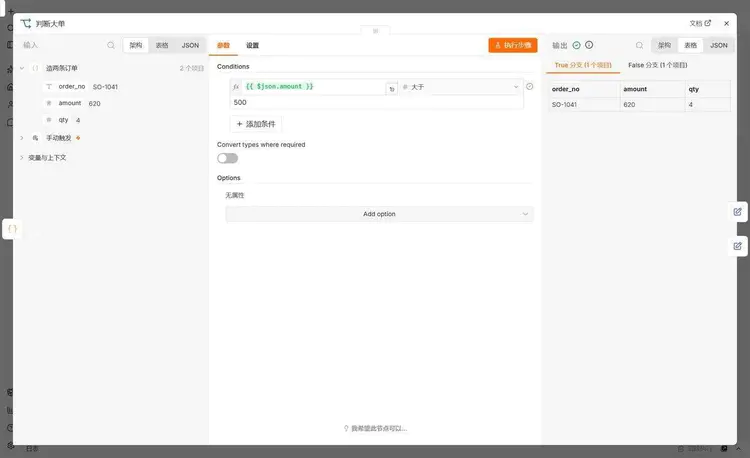
There is a conceptual misunderstanding here worth unpacking. Many people think IF is "choose one of two": if the condition is true, go this way; if not, go that way; only one path runs.
No. IF isrouting per itemI had it receive two orders, 620 and 180; the result was 1 item on the true branch and 1 item on the false branch, and both lines lit up. If you put 100 items of data in, it routes them to the two sides according to each item's own amount; it could be 30 on the left and 70 on the right, or 0 on one side.
So when it says "the node after IF didn't execute", first confirm whether that side had no data at all. This is not a fault.
Execution: one run, with a snapshot
An execution is this workflow being run once. Manually clicking once counts as one, the timer firing once counts as one, and a Webhook request coming in counts as one. It does not belong to the workflow JSON; it is stored in another table and relies on workflowId linking it back.
The fields I care about in an execution record:
| Field | The values in this record | What are they used for |
|---|---|---|
id |
35 | One auto-increment sequence for the whole instance, not starting from 1 for each workflow |
workflowId |
9biNEw9D0DqWOVV1 | Which workflow it belongs to |
mode |
manual | Whether it was run manually or in production |
status |
success | success, failed, canceled, crashed, waiting |
startedAt / stoppedAt |
01:17:42.352 / 01:17:42.513 | A difference of 161 milliseconds, exactly the “within 161 milliseconds” shown in the UI |
workflowVersionId |
A uuid | Which version this run used |
The last line is easy to overlook but very useful: executions are tied to versions. If you change parameters and don’t publish, production still runs the old version, and the execution record is attached to the old version’s id.
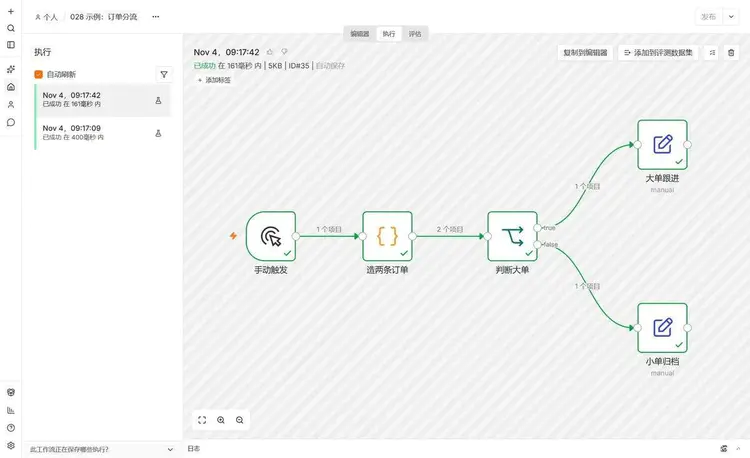
Another detail I only noticed this time: each execution stores a snapshot of the workflow at that time (workflowData). After I changed “Small Order Archive” to “Small Order Archive (Modified)”, I went back to the 09:17:42 execution, and the canvas still showed “Small Order Archive”—because rendering uses the snapshot that execution carries, not your current canvas.
This explains two things. The good side: when you change parameters or delete nodes, old records are not tampered with, so when you look back to troubleshoot, you see the scene as it was. The bad side: if you compare an old record with the current canvas, node names may not match; don’t assume you remembered it wrong.
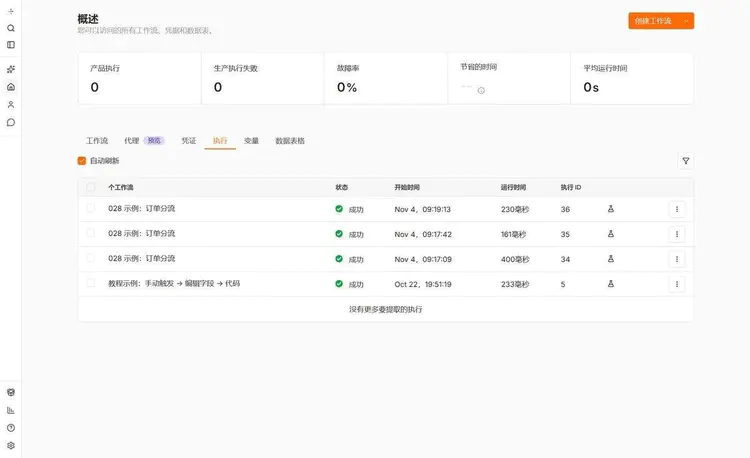
How long they are kept is a practical issue. Auto-cleanup is enabled by default: executions older than 336 hours (14 days) are deleted, and once the total exceeds 10000, deletion also starts from the oldest. Both success and failure are stored, and manual runs are also stored. Whichever of the two rules is hit first applies: a workflow that runs once every 5 minutes runs 288 times a day and accumulates 4032 entries in 14 days, hitting the age limit first; one that runs 2000 times a day reaches 10000 on the fifth day, hitting the count limit first. So “that run is not in the execution list” does not necessarily mean it didn’t run—it may already have been cleaned up.
Putting it together: a troubleshooting sequence
The four terms are all understandable separately, but in use they still need an order. My habit is to narrow from the outside in:
- First check the status in the execution record. If there is no record, it means it never triggered at all—the problem is in the trigger or publish status, not in the nodes.
- If the status is failed, click in to see which node is red. Check the input in the node details; most of the time the input is already wrong.
- If the status is success but the result is wrong, check the item counts on the connections. If a connection is 0, the downstream nodes naturally do nothing.
- If the numbers are right but the fields are wrong, only then suspect node parameters, or that the upstream changed the type.
The advantage of this order is that each step can rule out a large set of possibilities. Conversely, if you start by staring at the code in the Code node, you often spend half an hour before discovering that the upstream sent only 0 items.
How do you know you really understand it
You don’t need to memorize definitions; doing three things is enough, and each has an observable result.
1. Count them.However many blocks there are on the canvas, in the exported JSON nodes the array should have that many. Mine has 5, and the array length is 5. The same goes for the number of connections: 4 lines correspond to connections 4 source keys in it (the 判断大单 key contains two groups, but there are still 4 lines).
2. Change one connection.Delete the node on the false branch, then export again,判断大单 the second array group should become an empty array, rather than the whole group disappearing. This step lets you remember “the output is determined by position, not by whether there is a downstream.”
3. Run it twice.After running, go to “All Executions”; there should be one more record, with an ID 1 greater than the previous one, and the time is the moment you clicked. Then change a parameter, do not publish, run once, and then check the live version (scheduled or Webhook) to see that it still uses the old parameter—if this is your real business, it is recommended to do this step on a test workflow.
Five mistakes you will actually hit
1. Two nodes have the same name.You forget to rename after copying a node, or edit the JSON by hand. When saving, the server rejects it and reports Duplicate node name, and at the same time throws one unknown_connection_target. Don’t panic when you see two; just change it back to a unique name.
2. You change the node name, but the expression doesn’t change with it.Connections are automatically patched by the UI, but expressions are not. The previous node is called A, and downstream you use $('A').item.json.amount to fetch data; after renaming it to B, this line can no longer find anything, and the error points to the expression line, not to the renaming.
3. The publish button is grayed out.The workflow only has a manual trigger, and there is nothing that can go live. Hovering over it says “This workflow has no trigger node to publish.” Add a Schedule Trigger or Webhook to have something to publish.
4. After changing parameters, the scheduled task still runs the old logic.You changed the draft but didn’t click publish. This type of problem is the hardest to troubleshoot, because the canvas, parameters, and test executions are all normal; only the live behavior is wrong.
5. The execution record cannot be found.Three possibilities: it was cleaned up after the retention period, the workflow was deleted so the records went with it, or the “save successful runs too” toggle was turned off (EXECUTIONS_DATA_SAVE_ON_SUCCESS=none). The first two are the most common.
Risks of exporting, sharing, and leaving traces
A workflow JSON can be exported in full and sent to others. There are three places where information can leak.
Plaintext in parameters.The credential itself is not in the JSON (only a name reference remains), but parameters the parameters can contain anything: tokens in URLs, keys handwritten in HTTP request headers, and Webhook paths.grep Go through it once key、token、Bearer before sending it out—a two-minute job.
Execution records contain raw data.Whatever a node has processed is stored verbatim in the records—order numbers, customer names, and addresses are all there. Self-hosting lets you control the retention period yourself; setting EXECUTIONS_DATA_MAX_AGE it lower is the easiest approach; for instances shared by multiple people, it's best to set it from the start.
Directly pasting JSON sent by someone else.Pasting it in means running code they wrote on your instance; the JS in a Code node won't ask whether you want to execute it. Put workflows of unknown origin into an empty test instance, review them first, and then decide.
Summary
A workflow is the blueprint, nodes are the boxes on the blueprint, connections are the arrows between the boxes, and an execution is the specific time you build according to the blueprint. The four words correspond to four things; their positions are different, and so are the consequences of changing them: changing node parameters affects every future execution, changing an execution record cannot change anything (it is a record in the first place), and renaming makes connections follow along, but not necessarily expressions.
If I really had to choose the one thing most worth remembering first, it is that “executions carry snapshots.” It simultaneously explains why old records won't lie to you, why new changes don't necessarily take effect, and why once the cleanup period passes you can't look up anything.
To judge whether you understand it, there's a dumb method: open any workflow made by someone else, don't look at the canvas, look only at the exported JSON, and see whether you can state how many nodes it will run, how many paths, and which one is an empty run. If you can state that, you've passed on these four terms.
Moving on
If you haven't yet gotten your first workflow running, first read“The First Workflow: Manual Trigger → Edit Fields → Code”That article explains how to connect three nodes and get them running. Problems that keep you from getting started, such as startup errors and port conflicts, are inhereThe table of contents for the whole course is onthis page, node-related content is allunder this category.
Among triggers, the schedule type that is most prone to issues has a separate article:Workflow scheduled trigger not firing: troubleshooting 5 causes one by one。
References
- Key concept glossary: the official definitions of workflow, node, execution, and publish; this article aligns with these
- Understand workflows: what a workflow is, and the separate sections on creating workflows, components, and executions
- Connect nodes together: creating and deleting connections, where one node's output connects to another node's input
- Save and publish workflows: the autosave time range, publishing pins the version online, and production executions use the published version
- Understand executions: the difference between manual and production executions, and which executions count toward the quota
- If: data types and comparison methods for conditions, two outputs
- Executions environment variables: retain for 336 hours, cap at 10000 entries, and store both successes and failures; these are the default values
Last updated: November 4, 2026, using n8n 2.43.7.