Can an old hard drive be read after plugging it into a new NAS: the TerraMaster 2399 makes this clear


The hardest step in replacing a NAS has never been choosing which machine to buy; it is where those four old disks already full of data should go.
The most common scene is this: the new machine arrives, the four disks are pulled from the old machine and inserted into the new one in the original order, and it is powered on. In the system, all four hard drives are visible, the capacities are correct, and the indicator lights are normal. Click into the shared folders and they are empty. Most people's first reaction is that the disks are broken or the new machine has a problem—neither is actually true; those four disks originally belonged to an array, and none of them alone is "a bunch of files that can be opened directly."
Coincidentally, the promotional copy for the TerraMaster F4-213, which went on sale on 10/20, has a line that hits exactly this point: data disk direct mounting—old hard drives do not need formatting and can be read as soon as they are plugged in. To see for how many people this statement holds, I went through its official documentation; the conclusion is: it holds, but the scope is much narrower than the promotional copy suggests.
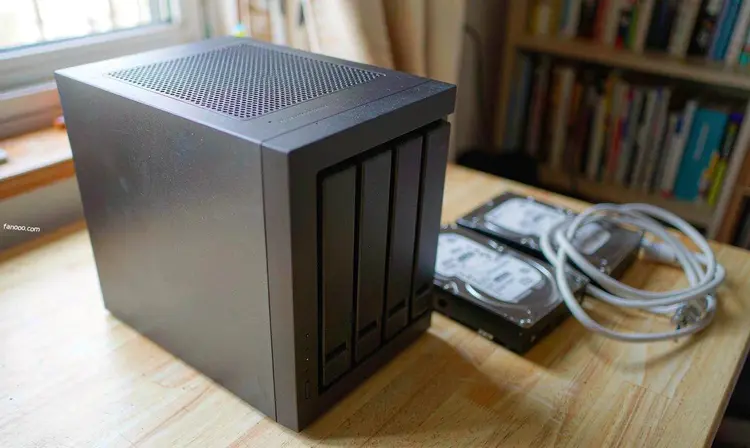
First, what this machine is
The F4-213 is TerraMaster's first four-bay model this year clearly positioned for home use. It went on sale at 8 p.m. on 10/20, with the unit priced at 2399 元 (IT之家 reported on 10/20); on 10/23, 快科技 and other media published another round of articles, with headlines basically all centering on the line "hard disk direct mounting without formatting."
Public specifications: Rockchip RK3576 8-core processor (8nm), 6TOPS NPU, built-in VPU hardware decoding, 4GB LPDDR5 memory, 1 2.5GbE port, 4 bays up to 128TB, microSD card reader; preinstalled with TOS 7, supports TRAID flexible array, snapshot, WORM tamper protection, can run Docker, and protocols include SMB, AFP, NFS, WebDAV, iSCSI, and SFTP/FTP. Pricing is subject to the official current price; there are often promotions around Double 11.
These numbers come from vendor press releases and media reports; I do not have a physical unit on hand. Below, any judgment involving hands-on feel will be marked as an inference.
The official conditions for "no formatting required for old disks" number four in total.
TerraMaster's official website has a page dedicated to this feature, called "Direct Data Disk Mounting." That page is actually quite clear; it is just that media articles usually quote only the last sentence. The four requirements are:
- The machine must first have a system disk running TOS 6.0.x or above. In other words, this is "data on another disk can be read," not "the whole machine boots directly from the old disk."
- The form factor of the data disk is limited to 3.5 英寸 SATA hard drives, 2.5 英寸 SATA hard drives/SSDs, or M.2 2280 NVMe.
- The file system must fall within the whitelist: EXT4, Btrfs, EXT3, NTFS, ExFAT, HFS+.
- Only direct mounting of a single hard drive is supported; a disk that originally belonged to a RAID array cannot be directly mounted.
This last condition is the key to the whole thing. The promotional line "old hard drives can be read as soon as they are plugged in" holds only on the premise that the disk was originally used as a single disk and was formatted with a standard file system. If you originally had a four-disk array and move all four disks over together, this feature will not help.
The official website also lists three easily overlooked notes, which I think are more worth knowing in advance than the four requirements above:
- Directories mounted directly are not subject to TOS permission management; only administrators can access them, and permissions cannot be assigned to family members;
- If you later want to merge this disk into a storage pool, you must first manually unmount it;
- Automatic mounting is not supported; every time the machine restarts, you have to go back to the control panel and click "Mount" again.
In other words, this is a channel for "temporarily taking data out," not a location that can serve as a long-term repository. It is well suited for migration; using it as a daily disk would be annoying.
Why RAID disks just don't work
The reason isn't mysterious. RAID splits files into small chunks, writes them across each disk according to the array parameters, and also stores the metadata for "how to reassemble them" on the disks. Take out a single disk, and it contains only a fraction of the fragments; the rest are on the other disks, and the assembly order is calculated according to the parameters at the time, not arranged in file order.
There's another layer of trouble: each vendor adds its own encapsulation on top of standard RAID. Synology's SHR and TerraMaster's TRAID are vendor-specific variants, and their parameters and metadata formats are not interoperable. So "moving the whole array" and "direct-reading a single disk" are two completely different things—the former requires the array information to be complete and recognized by the machine, while the latter only requires a standard filesystem.
This is also why official support never includes "importing another brand's array." The migration instructions from the three NAS vendors all cover how to move between their own models. This type of operation isn't completely impossible, but it requires manual array assembly via the command line and parameter alignment; you have to bear the risk yourself, so it's not suitable to recommend to others as a solution. How the storage pool is organized and where the system partition is placed, I covered inthe NAS storage tiering postand broke it down there; you can read it before deciding how to arrange the disks.
So how exactly should old disks be handled—four scenarios
1. The old disk is a single disk, and the filesystem is EXT4 or NTFS
The least troublesome case. Direct mounting lets you read it; copy the contents to the new disk, then format it and use it as a storage disk. Features like F4-213 are made for this situation and do save the trouble of "first finding a computer to copy everything over."
2. The old disks are in an array, and the new machine is still the same brand
Move the whole array, plug the disks back in according to the original slot order, and don't mix them up. The array information follows the disks; as long as the new machine recognizes this configuration, the data is there. This is the only case where "unplug and plug it back in and it works," and it's also why many people don't want to switch brands when changing machines—not out of sentiment, but because they can't be bothered to copy everything again.
3. The old disks are in an array, and you've also switched brands
There's no shortcut. Don't dismantle the old machine yet; leave it running, mount the new machine to it and copy over the network; or use an external drive with enough capacity as an intermediary. For an array of four 4TB disks, the actual data may be three or four TB; copying over a Gigabit network overnight is normal, and 2.5G can be considerably faster. There's no real trick in this step—it's just a matter of time and one backup disk.
4. Simply keep the old disks as cold backup
It's possible, but one precondition must be made clear: keeping a single array member disk alone does not constitute a backup—if you need it in the future, you still have to gather the whole set and have a machine that recognizes this configuration. If you really want to keep a copy, keep a single formatted disk, or simply buy another disk specifically for an offline copy. I won't repeat how to choose hard drives here;that post about CMR and SMRexplains it in detail; during price-increase cycles, the price difference between the two is not small.
At the 2399 price point, three things for tinkerers to watch out for
ARM architecture, not x86
RK3576 is arm64. Docker can run, but the image must be arm64. In the past two years most mainstream images have been published multi-arch, and the common ones are mostly fine; the trouble lies in niche tools, containers published only for x86, and a bunch of compose files copied around online—they specify image names, nobody checks the architecture, and running them directly reports exec format error. This is not a problem unique to TerraMaster; all low-cost ARM NAS are the same. Before buying, first figure out whether the services you want to run have arm64 versions.
4GB memory
Photo album indexing, running a few lightweight containers, and enabling a download and media service—enough. Want to run virtual machines, run a bunch of containers at the same time, or run large models locally—don't consider it. In public spec materials I haven't seen whether memory can be added by yourself; defer to official information on this, and asking customer service before buying is safer.
One 2.5G port, and I haven't seen a PCIe slot either
The theoretical upper limit of 2.5GbE is 312.5MB/s (converted from 2.5Gbps; actual throughput must deduct protocol overhead), enough for mechanical disk arrays, and this is also the most reasonable position for 2.5G in home scenarios over the past two years. But it is the ceiling of this machine: only one network port, and public specs show no PCIe expansion slot, so there is no path to 10GbE. There are other four-bay options at the same price,that QNAP model at 2599I wrote about it; putting the two side by side makes it clearer where the money goes; the overall thinking on machine selection is inHow to choose a home NASinside; first figure out three things, then look at the spec sheet.
My assessment
This machine doesn't sell performance; it sells “not having to do it all over again.”
For 2399, you get: four bays, an adequate 2.5G port, an NPU that can run photo album recognition locally, a TOS 7 that packs AI into the system layer, plus a direct mount feature that can really save the day. For people whose old disks are single disks, who want to switch to a new machine, and who don't want to tinker, this combination is reasonable.
But if you have a four-disk array and want to move the whole thing over, direct mount doesn't help; you still have to copy it all over the hard way—at this point the appeal of 2399 drops a lot, because the core capability you want isn't there, and no brand has it. What vendors can do is make the “move” sound more respectable; what they can't do is make arrays recognize each other across brands.
The three types of people who should take a look: old disks are single disks or NTFS external disks, there is just one device at home storing photos, want to build a media library for the TV but don't want to learn a bunch of stuff. People who can skip it for now: those already running a bunch of containers and virtual machines on an x86 NAS, those who want a 10GbE LAN, and those whose four disks are all array members and don't want to recopy.
Where's the pitfall? I think it's that the phrase “direct mount” easily gets read as “use it this way from now on.” It must be mounted manually, permissions are not managed, it cannot be directly merged into the storage pool, and it drops off after a reboot. It's great as a migration tool, but annoying as a daily mount.
Before you start, do four things
- In the old machine's control panel, clearly see what array and file system it actually is; don't guess from memory;
- Write down the slot order, preferably take a photo;
- Don't let the “only copy” go through this migration; first make sure another copy exists on a different physical device;
- For long-term data, at least two copies in different locations; this step has nothing to do with what machine you buy.
Ultimately, the most expensive part of switching NAS isn't the hardware—it's the migration cost of those several TB of data. Vendors put "old drives can be read as soon as they're plugged in" into their promotional copy because it really hits that cost point; but the copy won't tell you it only covers single drives. Spending ten extra minutes reading that documentation page on the official website before buying is more useful than reading ten reviews.
This article is compiled based on the IT之家 report on October 20, 2026 (F4-213 goes on sale, unit priced at 2399 yuan), the 快科技 report on October 23, 2026, and the TerraMaster official website "data drive direct-attached mount" documentation page (feature conditions and limitation clauses); product specifications and prices are subject to the manufacturer's official current prices. The hands-on experience portion in the article is inferred from public specifications, and no real-device testing was performed.