How to choose the Synology DS series: what is the difference between 2-bay and 4-bay?


A few days ago, a reader asked in the comments: both are Synology, but 2-bay and 4-bay differ by one or two thousand—what exactly does the extra money buy? He had actually already decided to buy; he just didn't want to pay this extra amount without understanding it.
This is a good question, because it has no standard answer—it depends on what you use this machine for. I went through the official specs and the product line changes I've noticed over the past year, and I'll explain it in three calculations based on "where the extra money goes"; after reading, you'll probably know which tier you should land in.
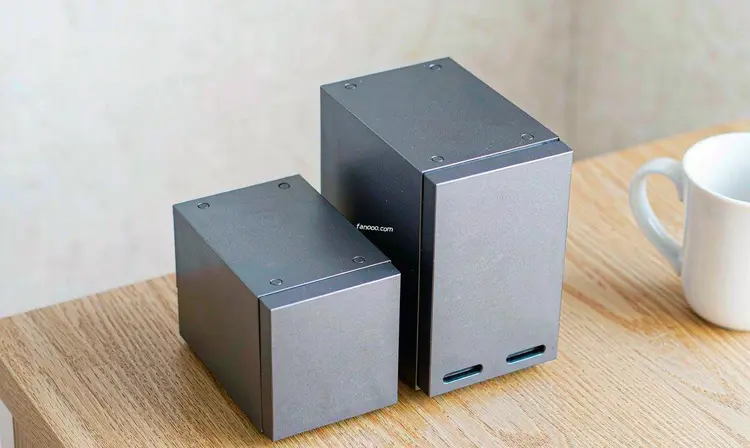
First, let's lay out Synology's current model lineup.
Synology's desktop models are tiered by bay count, and the names are basically in the format "DS + number + suffix":
- 2-bay: DS224+ (Celeron processor, no ECC memory, two Gigabit ports), DS225+ (one 2.5GbE plus one Gigabit), DS725+ (starts at 4GB memory, expandable to 32GB, no 10GbE upgrade path)
- 4-bay: DS425+, DS925+ (Ryzen V1500B, comes with 4GB DDR4 ECC memory from the factory, dual 2.5GbE ports, two M.2 slots, and can reach 9 bays after adding an expansion unit)
- 5-bay: DS1525+ (same Ryzen, one more bay than DS925+, and can add Synology's own 10GbE network card module)
- 8-bay: DS1825+ (with PCIe slot, can take a 10GbE or even 25G network card)
In August this year, this line gained a group of new faces. Synology announced on August 7 the neo+ series(DS725neo+ / DS925neo+ / DS1525neo+ / DS1825neo+), the official wording is to let users allocate hardware investment according to their own budget. In plain terms: same platform, same processor, change the factory memory from ECC to regular DDR4, and bring the price down.
If you go to Synology's China official website and look at the DS925+ page, you'll find that DS925+ and DS925neo+ are listed side by side in the same spec table, and the difference is written in the memory row: one is 4GB DDR4 ECC, the other is 4GB DDR4 non-ECC. The remaining bays, processor, network ports, and expansion capabilities are completely identical.
First calculation: bays buy usable capacity.
2-bay can only do mirroring (RAID 1); the two drives are copies of each other, and usable capacity equals the capacity of one drive; 4-bay can do SHR or RAID 5, one drive failure does not lose data, and usable capacity is about three-quarters of total capacity.
Put in concrete numbers and it's clear. Two 8T drives in mirroring give 8T usable; four 8T drives with single-drive fault tolerance give about 24T usable. The drive cost doubles, but usable space triples. The higher the bay count goes, the more cost-effective the "usable capacity bought per yuan"; this is the most tangible value of 4-bay and above.
The trade-offs must also be stated upfront: 4-bay machines are themselves more expensive, larger, and have higher power consumption. Take DS925+ as an example: official rated access power consumption is 37.91 W, 12.33 W when drives are hibernating, and noise is 20.5 dB. In a study you won't notice it much; tucked into a bedside cabinet, perhaps not.
So if your needs are just "computer backup + phone photos + storing some videos", two drives are really enough, and the extra money may not produce a noticeable return. If you want to sort out your needs first before looking at specs, you can check my earlierHow to Choose a Home NASthat one.
Second calculation: ECC memory—what the neo+ series cuts is exactly this.
What ECC memory does is correct occasional bit flips in memory before they are written to disk. The probability is very low, but if a machine holds an archive of family photos that exists only in one copy, you probably don't want to gamble on probability. DS925+, DS1525+, and DS1825+ ship with ECC DDR4.
The neo+ series switched the default memory to ordinary DDR4, which is why it is cheaper. Whether to pay extra for ECC, my view is that it depends on the scenario: if this machine is only cache or a temporary download area, it doesn't matter; if it is your main library, it's worth it.
Two other points are easy to miss. The neo+ has the same number of memory slots and upper limit as Plus, both two slots with a 32GB maximum, so switching back to ECC memory later is feasible; but if you use non-Synology memory modules to expand, the official side does not provide full product warranty and technical support, so you need to weigh that yourself.
The third account: whether you can add 10GbE later
Many people don't think of this when buying, and only regret it two years later.
DS925+ has no PCIe expansion slotand does not support 10GbE expansion cards; network bandwidth stops at dual 2.5GbE, with no changes after purchase. If you want 10GbE, you need DS1525+ (add Synology's E10G22-T1-Mini module) or DS1825+ (the PCIe slot can take a 10G / 25G NIC).
But don't rush to pay extra for 10GbE. 2.5GbE converts to roughly just over 300MB/s, while DS925+'s official sequential read/write is 522 / 565 MB/s—meaning this network port is usually not the bottleneck in a gigabit or 2.5G home LAN; what really bottlenecks you is more likely the switch, Ethernet cable, and computer NIC. Compared with network ports, drive selection is something most people will encounter earlier; how to distinguish CMR and SMR I covered inHow to choose NAS drivesthat article.
There is a pitfall that needs separate mention: M.2 slots still only accept first-party drives
In April 2025 Synology announced that that year's Plus models (DS925+, DS1525+) could only use drives on Synology's compatibility list to build storage pools. This caused quite a stir that year and did turn some people away. On October 8, 2025, Synology released DSM 7.3 (version number 7.3-81180), reversing this policy: 3.5-inch HDDs and 2.5-inch SATA SSDs returned to normal; third-party drives can be installed, can build pools, and can report health.
But one item was not opened up—M.2 NVMe SSDsFor 2025 models that want to use M.2 for cache or build an M.2 storage pool, they can still only buy the models listed by Synology itself. This status continued unchanged in DSM 7.4 released on June 16, 2026.
The good news is that older models are unaffected. DS923+, DS423+, DS224+, and other products before 2025 were never governed by this policy. If you have these, or buy a used older model, you can choose drives freely.
Also don't ignore Synology's real weakness
What makes Synology valuable is the DSM system and its package ecosystem. Many people buy it for peace of mind:running automation tasks on SynologyOther vendors can do this kind of thing too, but Synology pushes the barrier very low; this is its moat.
On hardware, you have to accept one statement: DS925+, DS1525+, and DS1825+ use Ryzen V1500B, and this processorhas no integrated graphicsThe consequence is that 4K hardware transcoding in Plex and Jellyfin will be very tough, and software transcoding will max out the CPU. Conversely, older Intel models (DS224+, DS423+) are easier on transcoding.
If you mainly rely on client direct playback of content it can decode, then transcoding is not involved and the impact is small. If you want to use it as a home theater server and feed movies to a bunch of old devices, you need to think this through in advance.
So how do you actually choose?
Matching by requirements is far more useful than agonizing over specs:
- Only for backup and photos: 2-bay (DS224+ / DS225+ / DS725+), two drives mirrored, enough.
- Have a media library and need to run Docker: 4-bay DS925+. If you want ECC, it’s the one; if you think ECC is unnecessary, look at DS925neo+ on the same platform.
- Want spare bays and plan to move to 10GbE later: DS1525+. A five-bay setup with SHR-2 can tolerate two drive failures and still leaves room for 10GbE.
There’s an old saying worth repeating: drives often cost more than the host, and they are the part that actually fails. Buying a 4-bay and leaving three slots empty is worse than filling the drives first. This matches SHR’s flexibility—SHR allows mixing drives of different capacities and expanding one bay at a time, so buying small drives first and adding larger ones later doesn’t put you at a disadvantage; this is friendlier than traditional RAID.Switching from RAID 1 to SHRI wrote about the process a few years ago; the conclusion is that data loss is unlikely, but you must back up before starting.
One thing you should do before choosing a model
RAID is not backup. It solves “a drive fails, keep the service running”; it cannot solve accidental deletion, malware infection, or water getting into the room.
For data you truly cannot afford to lose, keep one local copy and one off-site copy, and don’t put the two copies in the same room. For how to place the off-site copy and the budget-based configuration options, I put it together inCloud Server Purchasingon that page; just match it against your own situation.
Before writing this, I checked the specs: model specs are taken from the product page on Synology China’s official website (the side-by-side spec table for DS925+ and DS925neo+, including processor, memory type, bays, network ports, power consumption, and noise); the release timing and official wording for the neo+ series are taken from Synology’s August 7, 2026 press release; the timeline of the drive compatibility policy (announced in April 2025, changed back in DSM 7.3 on October 8, 2025, M.2 NVMe not opened up, and continued with DSM 7.4 on June 16, 2026) comes from cross-checking Synology’s official drive policy statement against multiple public reviews. I did not write specific prices because they vary quite a bit across channels; please refer to the official current price. I have not long-term tested these machines myself; judgments involving usage experience are based on public information—treat them as reference, not conclusions.
Full article index · Back to homepage
Advertisement · This article contains promotional links
If you’re going to tinker, you need a machine first
The commands and services below all require a server that stays online long-term.
Alibaba Cloud server promotion entry →
If you’re not sure what configuration to buy, read this first:How to choose a personal cloud server (configuration, bandwidth, renewal price)
Purchase through this link,I will not charge you any extra fees.(The referral commission is settled by Alibaba Cloud), and the price displayed on the order page is the actual amount paid. The model, price, and campaign rules are subject to the Alibaba Cloud page; this article does not guarantee the discount level and does not constitute purchasing advice.